Sunday, February 7, 2016

104-How To Clone Remote GitHub Repo Using GitHub Desktop application


.
104-How To Clone Remote GitHub Repo Using GitHub Desktop application

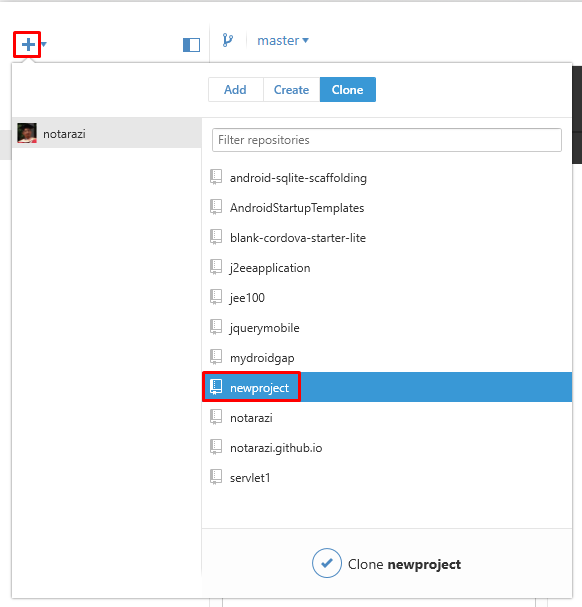
1) Run GitHub Desktop application

2) Find the Add new project.

3) Clone the project

Select Clone button.
Select your local folder to clone the selected remote directory.
Done.
.

103- How To Save Remote GitHub Repo Using GitHub Desktop Application


.
103- How To Save Remote GitHub Repo Using GitHub Desktop Application

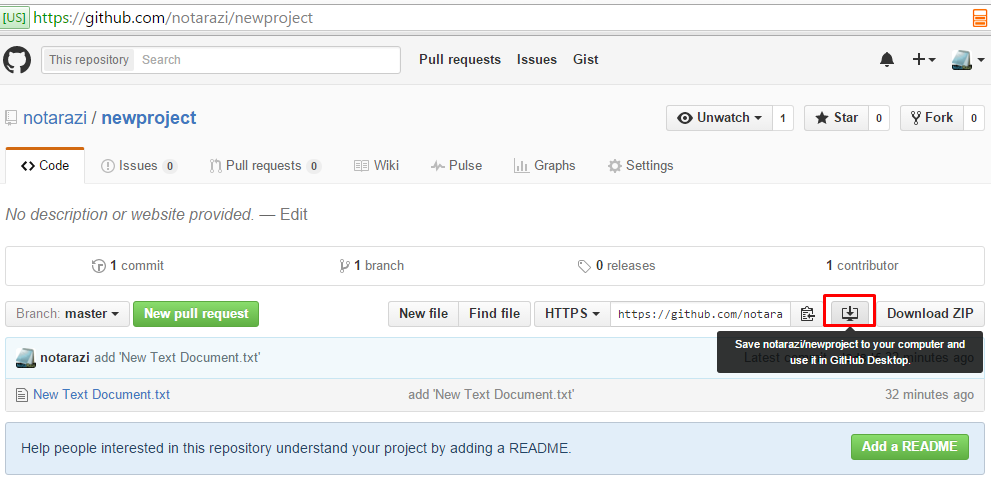
1) Log into GitHub account

2) Find the Download button

3) Dowload to local folder

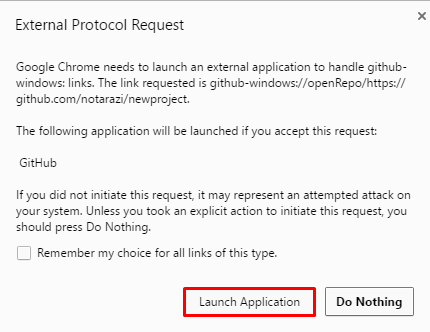
Click the button and allow GitHub Desktop application to run.
Select your local folder to clone the selected remote directory.
Done.
.

102 How To Create Remote GitHub Repository on GitHub.com


.
102 How To Create Remote GitHub Repository on GitHub.com

0) Starting Up

1) Log into your GitHub account

You should see the green button “+New Repository”.
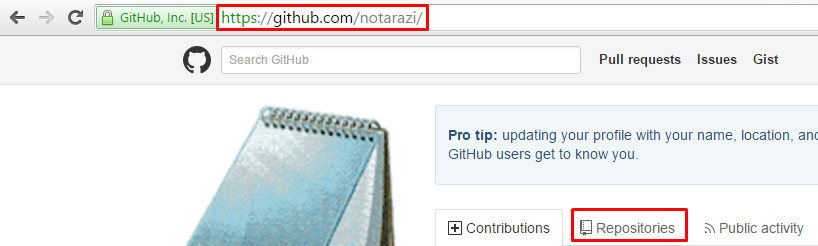
Alternatively, you can visit your account page eg https://github.com/notarazi and click the Repositories tab. Click the New button.

2) Create a new Project

Type the name “newproject” and click Create Repository.

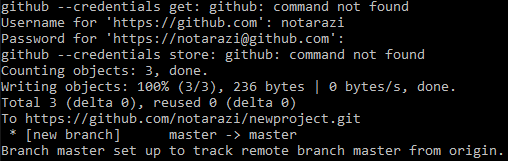
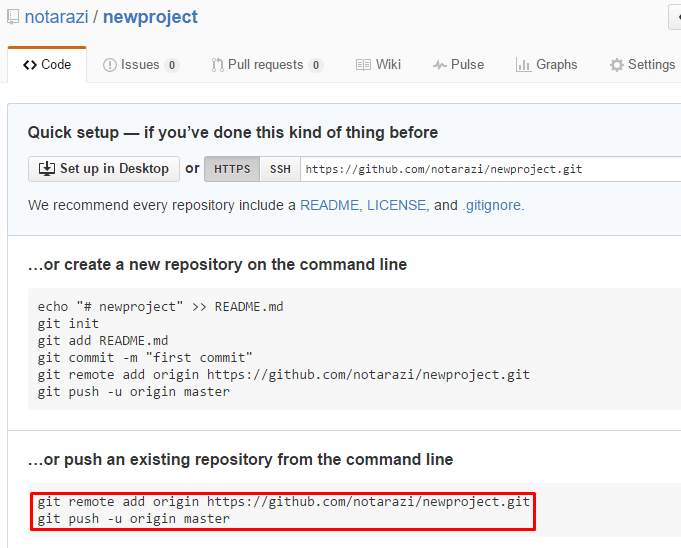
3) Link your local project to the remote project

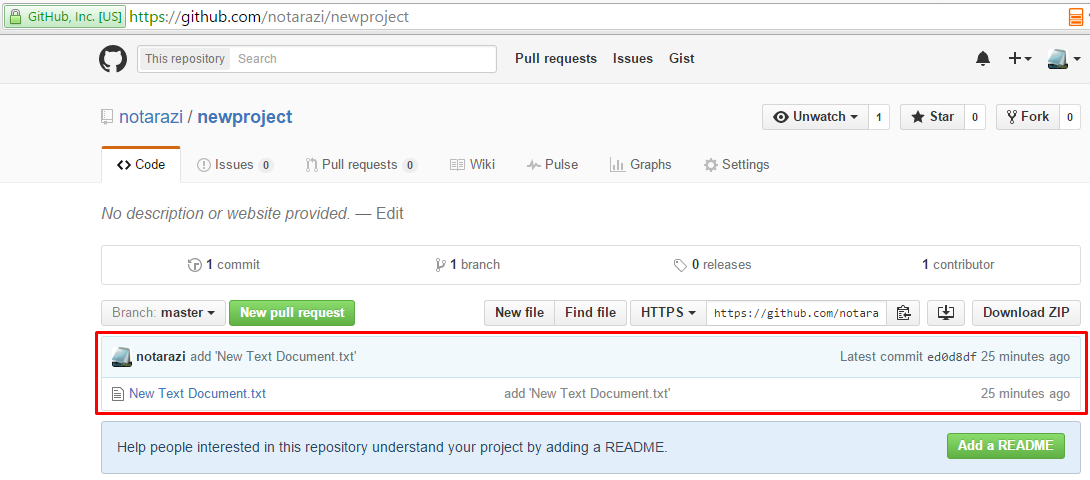
You may be required to enter your username and password during this process.

Done.

.

101 How To Create Local GitHub Repository Using Windows Command


.
101 How To Create Local GitHub Repository Using Windows Command

0) Pre-Requisite

Install GitHub to your computer. Download here.
Add GitHub program to your windows environment. Read here.
You have to register an account at www.github.com in order to work with GitHub Repository

1) Run Git Command via Windows Console

Press Windows Start Button, type cmd and press Enter key.
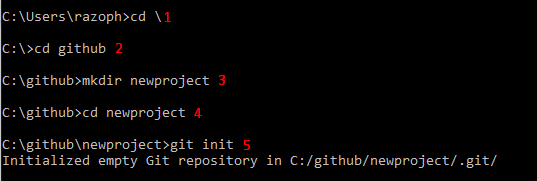
1.1) Type cd \ to go to root of your computer.
1.2) Assuming that you have already created a folder github, type cd github to go to that folder.
1.3) Type mkdir newproject to create a new project folder for your local repository (or repo).
1.4) Type cd newproject to go into the folder.
We are going to start typing git command.
1.5) Type git init
You should get a response...
Initialized empty Git repository in C:/github/newproject/.git/
(The screenshot below shows Steps 1 to 5)
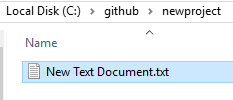
1.6) Add a new text file using Windows Explorer.
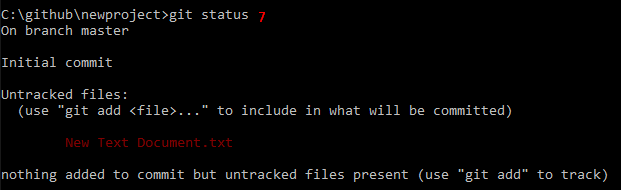
1.7) Check the changes in Command Windows. Type git status
You should get a response…
On branch master
Initial commit
Untracked files:
  (use "git add <file>..." to include in what will be committed)
        New Text Document.txt
nothing added to commit but untracked files present (use "git add" to track)
(The screenshot below shows Step 7)
Git did not track your file.
You need to give a command for Git to track the file
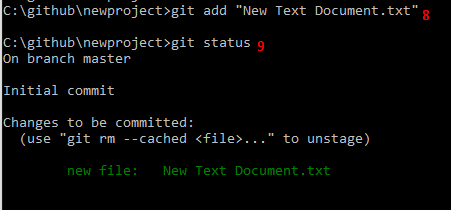
1.8) Type git add “New Text Document.txt” and then ...
1.9) ...type git status to check the outcome.
(The screenshot below shows Steps 8 to 9)
Git has tracked your file.
1.10) Type git commit -m "add 'New Text Document.txt'" to put a note on what you have committed.
.

How To Install GitHub On Win 10


.


.
Install GitHub On Windows 10

1) Download GitHub Setup

Download from here.

2) Run GitHub Setup

Wait…
After installation, GitHub will load repositories.

3) Log In Screen

Configure email address.

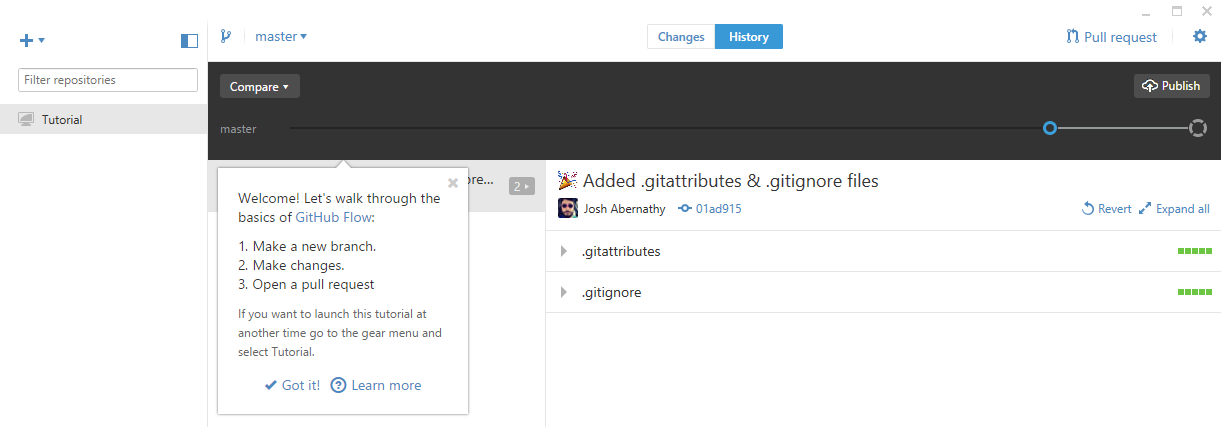
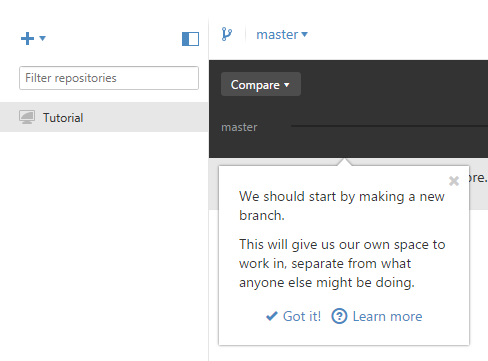
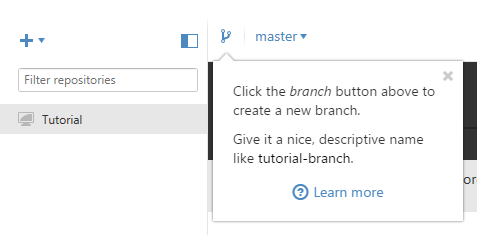
4) Walkthrough Tutorial

5) Add Git Path To Windows System Environment Variable

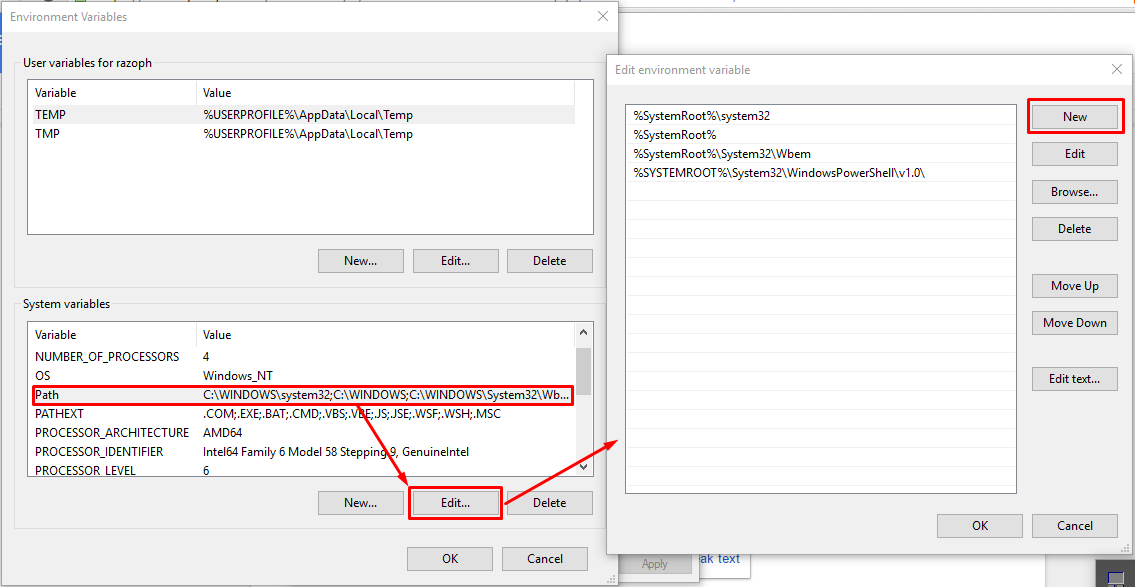
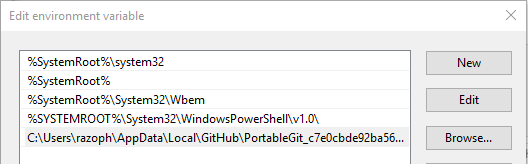
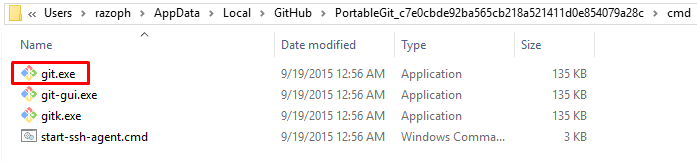
Find git.exe file. Usually it is located in C:\Users\<user>\AppData\Local\GitHub\PortableGit_<guid>\cmd
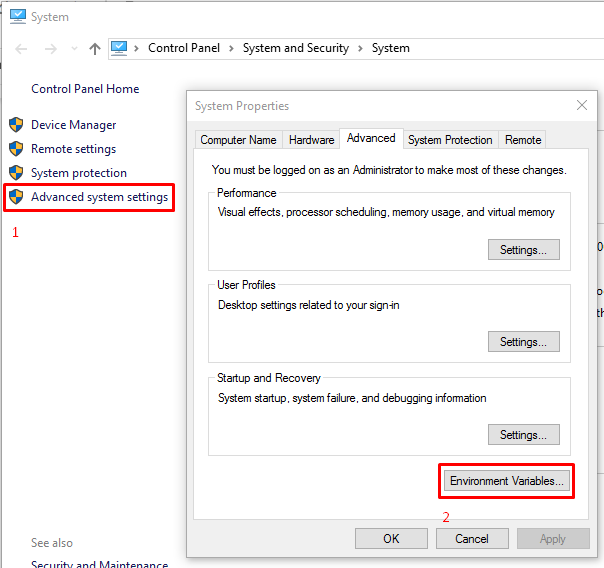
Copy the path and add it to Windows Environment Variable editor.
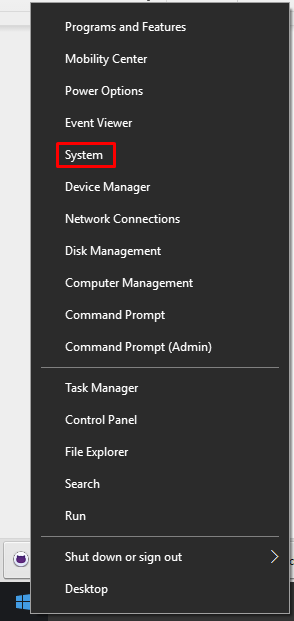
Right-click Start Button and select System.
Close the Windows System application.
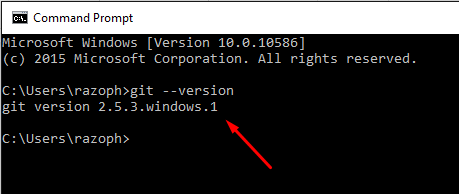
Run Command Window and test with the command  git --version.


.
.
Why is the Zend Framework not popular?


.
copied from: https://www.quora.com/Why-is-the-Zend-Framework-not-popular#
.
Bill Karwin, SQL developer, consultant, trainer, and author.
16.1k Views • Bill is a Most Viewed Writer in PHP (programming language) with 220+ answers.
I was the project lead of Zend Framework for their 1.0 release, back in 2007. The original goals of Zend Framework were:
  • Don't try to solve every corner case of everyone's app. Try to provide a solution for the 80% common cases, to keep the code simpler. But this means that the framework as it stands cannot match any app's requirements exactly, because any given app is likely to need some custom functionality in at least one component or another.
  • Loose coupling between components of the framework, to make it easy for people to use an alternative component if any of the ZF components don't meet their needs. That was the intended way to solve the other 20% of cases. But very loose coupling meant that in many cases, the "right way" to implement a web app was too vague and too flexible.
  • Make sure the code is "clean" and does not reuse code that anyone else has a claim to. This was important to some of Zend's customers in the wake of the SCO v. IBM lawsuit. Many people were anxious that using a single line of illicit code could be the grounds of a multi-billion dollar lawsuit (or even not using illicit code, but being sued anyway, to prove it). So every line of ZF code is original, even to the extent of reinventing classes that already existed in other libraries. And this requirement was viewed negatively by potential contributors who objected to signing a Contributor License Agreement to assure that they were not contributing code that was already copyrighted. Ultimately, this requirement for clean code was not important to the developers who choose frameworks.
  • To distinguish ZF from Java frameworks like Spring or Hibernate, it was a strong policy that there should be no XML files to hold application configuration. But this meant that configuration had to be done with PHP code. But really there were configuration files, just not written in XML. Again, vague and over-flexible usage made it a confusing process to learn how to create an app.
After I left the project for another opportunity, the team kept developing Zend Framework, and announced their plans for a Zend Framework 2.0, which would not be constrained by backward-compatibility with ZF 1.x. What this meant was that there were two official Zend Frameworks in the market, with very different usage so that you had to recode your app to migrate from ZF1 to ZF2. In a way, Zend Framework became its own competitor.

ZF2 also gradually became more and more complex, adding many layers of classes for reasons that seemed abstract and confusing to most users. The layers of classes written in pure PHP caused a lot of runtime overhead, giving ZF2 the worst performance of any popular framework, even worse than ZF1 (cf. Performance benchmark of popular PHP frameworks).

I think a primary problem for the Zend Framework was that the project didn't really use Zend Framework for a web application project. They had a lot of unit tests, but the developers had no direct experience of how it served as a runtime component of an app that was under production load. There's something to be said for software projects that grow organically, developed as an in-house solution by the people who need it to serve their needs, and then later released as a public product.

So the end result is that Zend Framework is:
  • Complex and hard to learn
  • Not backward-compatible with its own earlier version
  • Very slow
So I am not surprised that it Zend Framework doesn't have more adoption. It was quite popular for a few years, but as soon as something else came along that could beat it in one of these aspects, the number of new adopters dropped off.
.

Most popular PHP Frameworks 2015 [INFOGRAPHIC]


.
PHP is one of the most popular writing languages in today’s coding world. The reasons why, by latest statistics- it is preferred by 82% of the world’s web server software for its flexibility, database support, interactivity and abundance of Frameworks, that are easy to learn and can make the performance of your website lightning-fast. Thanks to their convenient file structure PHP frameworks give you the opportunity to organize your files and code and increase productivity.
Frameworks like Laravel, CodeIgniter, Symfony 2, CakePHP and Phalcon give you basic tools and functionality you can use, but at the same time allow for the freedom to select and modify them in a manner directly corresponding to your needs and goals.
Based on SitePoint’s “Best PHP Frameworks 2015 survey”, Google and Github trends, and our own research for what our clients are using and looking for. Here are the hottest PHP Frameworks today.
 Popular PHP Frameworks 2015 Infographic


.

Labels